A read-later app · Invite only, for now
Read more of what interests you. Keep what matters.
Klipstack is a read-later app for curious people. It helps you choose what to read next, gives you a calm page to read it on, and makes it easy to pause at the end and keep what stayed with you.
Your library is private. You share only what you choose to publish.
Klipstack lets people in a few at a time.
One article, start to finish
Follow one article through Klipstack.
The examples below work like the app, with a sample essay. Try them: nothing you do here is saved or published.
Step 1 · Choose
Find something you want to read now.
Home starts with a simple question: how much time do you have? Pick fifteen minutes and you see what fits, counting only the minutes left in articles you've started.
Pick up where you left off, see what you saved lately, and meet a few older saves you may have forgotten, a different few each day. Follow a site's feed, and its new posts wait beside your library until you decide to save one.
Everything here comes from what you saved and the sites you follow. No trending lists, no sponsored picks.
Continue reading
field-notes.example
The slow pleasures of a long walk
9 min left
Recently saved
streets.example
Why cities need more benches
12 min
- Read it
essays.example
What we keep from what we read
4 min
From a while ago
Saved more than 14 days ago. A different few each day.
kitchen-notes.example
How bread taught me patience
7 min
Step 2 · Read
Enjoy reading it.
Klipstack keeps a clean copy of each article: no ads or pop-ups, in the font and size you like, light or dark. It remembers where you stopped, and unread articles are ready offline.
Highlight the lines you want to remember and write in the margin. Highlights are private: marking a line never shares it.
Tap a sentence to highlight it. Tap a highlight to remove it.
essays.example · 4 min read
What we keep from what we read
Most of what we read is gone within a week. The article was good, and we nodded along. Then the next tab opened, and it slid under everything that came after.
Readers solved this long ago, with a pencil. A marked sentence is a note to your future self. A line in the margin starts a conversation you can pick up years later.
None of it takes long: a minute at the end, before the next thing. What you write there is the part of the article that becomes yours.
Step 3 · Capture
What stayed with you?
A thought, a question, or something you want to try.
When you reach the end, Klipstack leaves room for a moment before the next thing: a note on the article, for you alone. Write it in your own words, and link another article you saved if this one reminded you of it.
Write a line or skip it. Leave without a note and the article is still finished and filed in your archive, highlights and all, once you've reached the end. You can add a note whenever you come back.
If it's worth passing on, mark it for your next edition. You get a second, separate note for your readers, which can start from your private one and be polished later.
essays.example · What we keep from what we read
Finished It goes to your archive when you leave.
Write a line, or don't. Both are fine.
Step 4 · Revisit or share
A library that's yours. Share when you want to.
Your highlights and notes collect in your notebook, by article, and search covers them along with every word you saved. Each day, Home brings back a few highlights from a while back, for another look.
Editions
What did you read this week?
An edition is a shareable collection of good reads, with your thoughts attached. Gather the articles you marked, choose a few highlights to quote, add a line or two, and publish one link. It sends readers to the original articles; it doesn't republish them.
Your library is private. An edition goes public only when you publish it, shows only what you chose, and asks search engines to skip it. Editions are in beta.
Notebook
Only youWhat we keep from what we read
essays.example · 2 highlights
A marked sentence is a note to your future self.
This is why I highlight at all.What you write there is the part of the article that becomes yours.
Not in an edition
The article stays in your library, private. Mark it for your next edition to see how one would look.
Public beta · iPhone
Klipstack on your iPhone.
The iPhone app is in public beta on TestFlight, on its way to the App Store. It brings the same reading with you: Home's next reads, the clean reader, your highlights, and the note at the end of every article.
TestFlight is Apple's app for trying apps before they reach the App Store.
To sign in, you need a Klipstack account, and creating one takes an invite code.
Save from any app
Share a link from Safari, or any app with a share button, and it goes straight to your library.
Listen when you can't read
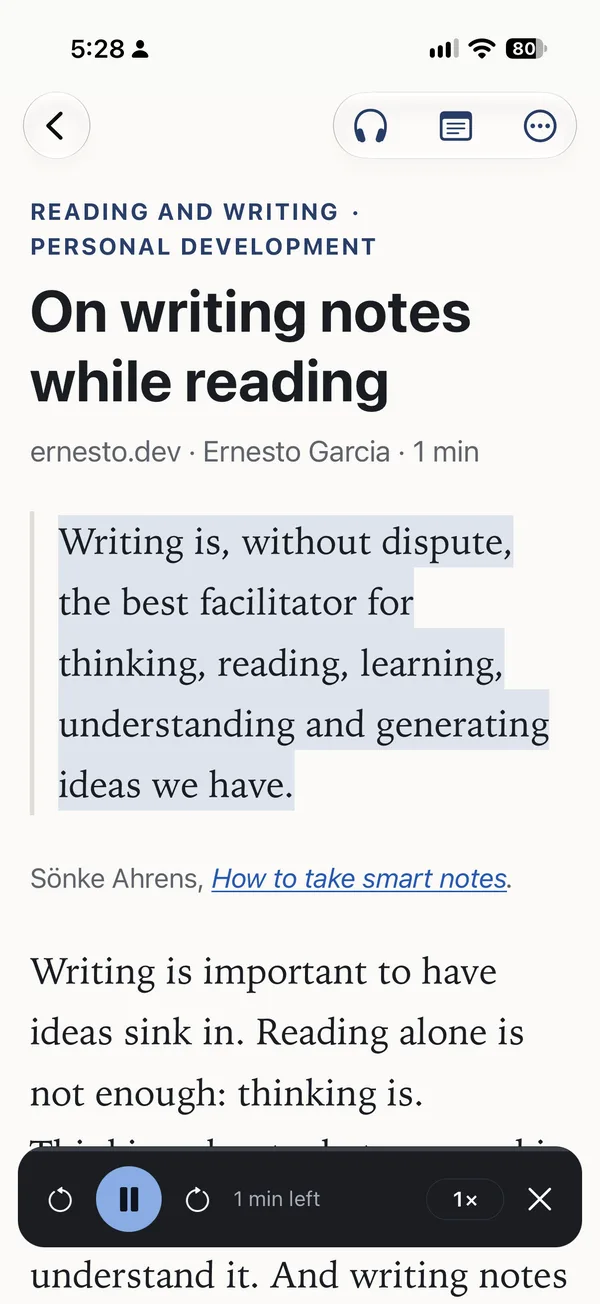
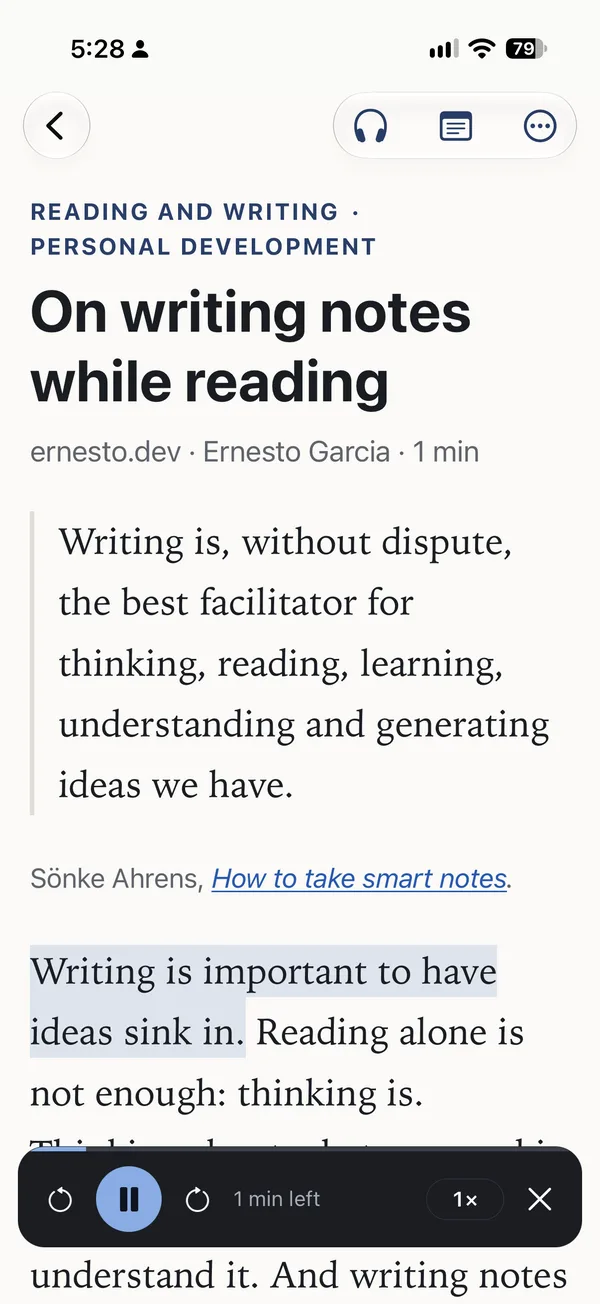
Klipstack reads articles aloud, in English or Spanish, marking each sentence as it goes. The voice runs on your phone, so after a one-time download it works offline too.
Your next read, on your home screen
A widget shows what's next, one tap away from reading it.
One account, one library: what you save on your phone is waiting on your computer, and the other way around.
The basics
A good read-later app, first of all.
Save from anywhere
Paste a link, use the browser extension for Chrome, or follow a site's feed. The extension saves the page as you see it, even behind a login.
Read your way
Serif, sans or a font for dyslexic readers, three widths, light or dark. Unread and starred articles stay on your device for reading offline.
Find it again
Search every word you saved, your highlights and notes too. Tag what you like and keep the searches you repeat in the sidebar.
Who makes it
Made by one reader.
Hi, I'm Ernesto. I built Klipstack for my own reading. I wanted an easier way to choose the next thing to read, a calm page to read it on, and a reason to stop for a minute at the end and write down what I took from it, before moving on.
Now I'm opening it to other people who might like reading this way. I build and run it myself, so invites go out a few at a time, as there's room.
— Ernesto
Your reading, your terms
Private by default. Easy to leave.
Pocket closed in July 2025 and Omnivore in November 2024, and their readers had to move years of reading on someone else's deadline. Klipstack makes leaving easy instead of asking you to trust that it lasts forever.
Private unless you publish.
Your library, highlights and notes are yours alone. Only an edition you publish is public, and only what you put in it.
No ads. No trackers.
Klipstack never shows ads or sells what you read, and it uses no analytics services.
Export everything, any time.
One download from Settings: a Markdown file for every article with its highlights and notes, plus a JSON bundle of it all.
Delete means deleted.
Deleted articles wait 30 days in the trash, then they're gone. Delete your account and everything goes with it, editions included; backups age out within 30 days.
Your copy outlives the link.
Klipstack keeps a clean copy of each article and its images, so it stays readable when the original changes or disappears.
Open source.
The code is public under the AGPL, and there's a guide to running your own copy with Docker if you'd rather host it yourself.
Questions
Straight answers.
Is it free?
Today there's nothing to pay and no card to enter. Pricing isn't decided yet. When it is, it will be on this page before anyone is asked to pay.
Why is it invite-only?
One person builds and runs Klipstack. Every new reader adds storage and server work, so people come in a few at a time, by email invite, as there's room.
Do I have to write something after every article?
No. The note at the end is an invitation, not a step. Read to the end and close it, and it's finished, with or without a note. Plenty of articles don't need one.
Is my note what an edition shows?
No. Your note on an article is private. Marking an article for an edition gives you a separate note for your readers, which you can start from your private one. An edition shows your private note only if you choose to include it.
How much of an article can an edition quote?
Up to three highlights per article, and no more than a tenth of its words, 150 at most. An edition points to good writing; it can't rebuild the piece.
Can I import from Pocket or Omnivore?
Not yet. There's no importer for Pocket, Omnivore, Instapaper or Readwise today, so keep your export file. You can save links one at a time and bring your feeds over with OPML.
Is there an app?
Klipstack runs in the browser on your computer and your phone, and unread and starred articles stay available offline. An iPhone app is in public beta on TestFlight; it saves from the share sheet and reads articles aloud. There's no Android app.
Is there a browser extension?
Yes, for Chrome: install it from the Chrome Web Store (Settings links to it). Firefox and Safari are coming later.
How do I find things later?
Search covers every saved word, your highlights and your notes. Narrow it with filters such as tag:, site: or before:, keep the searches you repeat, and press ⌘K (Ctrl K) to jump anywhere.
Does Klipstack use AI?
Reading, notes and editions don't need it. Some readers are trying optional features in beta: asking about a passage as you read, a short brief of an article, and sorting the library into topics. You can also connect an assistant such as Claude to search your library, decide whether it may also make changes, such as saving, tagging and writing notes, and disconnect it any time.
Who can see what I read?
Only you. Your library, tags, highlights and notes are private. An edition goes public only when you publish it, and it shows only what you chose.
Invite only, for now
Request an invite.
Leave your email, and a line about what you like to read if you want. When there's room, you'll get one email with your invite. It may take a while: people come in a few at a time.
Your email is used for the invite and nothing else. No newsletter, no marketing.